Wednesday, January 28, 2015

To download hike messenger app click here.
Hike Messenger - Android Apps on Google Play


Hike is a cross-platform messaging app that can send messages, videos, images, contacts, locations & favicons to the other users. It was launched on 12 December 2012 and became one of the most used messengers all across India. Apart from basic social messaging means like photos, videos and audio files, Hike allows users to "nudge", a feature used to ping the receiver. In addition to that, the application supports chat themes, graphical stickers, PDF files and Microsoft Office files, and allows users to hide an individual chat or group for extended privacy.


Hike Messenger TV Ad Video


Thursday, November 13, 2014

Messenger Google Play Store via Android Police

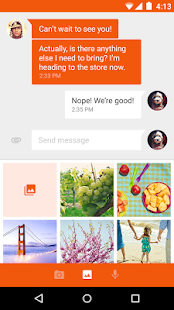
Key features of Google Messenger:
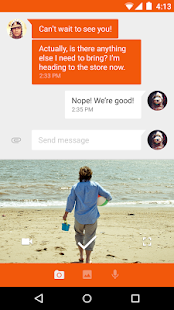
• Faster sharing: Select or take pictures and videos directly from the app and share easily. You can even send audio messages to your contacts.• Easy search: Search through contacts and conversation threads to find exactly what you are looking for.
• Purposeful design: New, fluid, material design that is intuitive and delightful.
• More control: Ability to block SMS senders. No interruptions when you don’t want them!
• More features: audio messages, emoji support 😃, colored text threads, message archiving and more.
Tuesday, May 27, 2014

Features:
- You can use 2 numbers in one device
- You can take a Backup of Data & restore it
- You can choose the app icon
- Copy contacts status
- Preview images without saving it locally
- Watch videos online without download (Open them on Video Players (such as MX Player))
- And more
Installation:
- Take a backup for your messages (In case you want the messages)
- Clear WhatsApp data (or reinstall it)
- Rename /sdcard/WhatsApp folder to /sdcard/OGWhatsApp
- In OG version verify the old number, and in official version verify the new one
 Download:
You can download OGWhatsApp from here


WhatsApp registers only one number for each mobile phone with a SIM card to activate it. Once installed, your SIM number got registered and the app syncs data with your phone book and you see all of your friends available on your WhatsApp contacts. WhatsApp doesn’t allow you to activate your second number officially, if you have phone with dual SIM mode, you have to choose one of the SIM cards for its activation. And if you try to mess with the app and try switching between your numbers frequently, you can get your account deactivated or blocked.
Thursday, May 16, 2013


In the long run, they intend to include advanced features like groups, screen sharing, and the recently announced Channels to the other platforms. Keep an eye out for this one in Google Play over the next couple of months, and expect it to displace a lot of the current messaging platforms out there.
BlackBerry Messenger is a downloadable application that serves users as a communication freeware for use in their mobile BlackBerry devices.
Developed by Research in Motion Limited, BlackBerry Messenger is an instant messaging application that gives customization abilities to its users. With this app, utilizes can pick an image of their choice as their personal avatar, add contacts with the analysis of specialized bar codes or PINS, as well as exchange and share photos, videos and audio files to several people all at the same time.
Moreover, BlackBerry Messenger also enables users to create online group of their friends and families, establish a classified list of conversations by date, and find music through access to friends’ playlists.
Staying in touch with the app user’s BlackBerry contacts is just a punch of a button away specially with the application’s simplified and easy to use interface and user-friendly wording and menu organization.
BBM Voice includes a number of convenient features.
- Customers can initiate a BBM Voice call directly, or instantly switch from a BBM text chat to talk, and back again.
- The split-screen feature allows customers to talk and text at the same time, so for example, they can send a picture to their contact while talking with them. They can also check other BBM text chats, check email, or navigate to other apps while engaged on a BBM Voice call.
- BBM provides a visual indicator that shows when contacts are available for a voice call.
- BBM Voice is compatible with any accessories a customer has now for making voice calls on their BlackBerry smartphone, such as a Bluetooth® or wired headset. Customers can also use BBM Voice over their BlackBerry smartphone's speakerphone.
- If it's not an ideal time to talk, customers can simply choose to respond by texting back.
BBM version 7 with the new BBM Voice feature is currently available in Beta for BlackBerry smartphones running the BlackBerry® 6 OS or higher with support planned for smartphones running the BlackBerry 5 OS at a future date. The Beta can be downloaded for free from BlackBerry Beta Zone**. Customers can sign up to BlackBerry Beta Zone for free at www.BlackBerry.com/betazone
For more information about BBM version 7 and BBM Voice, please visit www.BlackBerry.com/betazone.
Tuesday, October 30, 2007
Yahoo introduced its Yahoo! Messenger 9.0 Beta, the next version of a popular IM software for Windows. This new version has a whole new look and feel, along with some great new features that make it well worth the upgrade.
In Yahoo! Messenger 9.0 Beta when you paste a YouTube video URL in chat window, your friends can watch the video clip inline without having to visit the YouTube Website.
You can easily share photos from your Flickr.com account, or save photos shared with you directly to Flickr.
Another useful feature - if you are going Offline, you can configure Yahoo! Messenger 9 to forward all the Offline IM message to a your mobile number as SMS text messages.
You can have your incoming Phone In or free PC calls forwarded to another number like your mobile, home or office phone, even if you’re signed out of Messenger (Phone Out account required). Plus there’s a new way to get voicemail. When someone leaves you a voicemail in Messenger, an email is sent to you with an MP3 of the voice message attached.
To download the latest version click here.
http://beta.messenger.yahoo.com/
Yahoo! Messenger 9 is only available for Windows XP and Vista. A localized Hindi version of Yahoo! Messenger 9 is also available for Indian users.
Here’s a brief video that demonstrates the new features of Yahoo! Messenger 9.0:
The new Yahoo! Messenger 9.0 also offers localized versions in six new markets: Philippines, Indonesia, Malaysia, Thailand, India (Hindi), and Vietnam. With these additions, Yahoo! Messenger is available in 25 international markets.


