Monday, October 16, 2023
The Information Technology Act, 2000 is a landmark legislation regarding cybersecurity in India. It was the country's first-ever cybersecurity law and provides a legal framework for addressing various cybercrimes and related issues.
.jpg)
The Information Technology Rules, 2021, released by the Indian Ministry of Electronics and Information Technology, also play a role in cybersecurity regulation. These rules, which replace the original rules from 2011, introduce new obligations for intermediaries and digital media companies.
It's important to note that cybersecurity laws and regulations are continually evolving, so it's recommended to refer to official government sources for the most up-to-date information on cyber security legislation in India.
.jpg)
In India, the Information Technology Act of 2000 is currently the main legislation that addresses cyber security. This Act is a broad piece of legislation that addresses multiple areas of information technology, with multiple amendments over time to keep it up to date with current technological advances. As far as specific cyber security-related aspects, the Act addresses the use of technology for crime prevention and investigation, as well as the right to privacy and data protection. There are several other laws and policies related to cyber security in India, but the IT Act of 2000 is currently the foundational legislative framework.
Here are some of the key pieces of cybersecurity legislation and regulations in India:
Information Technology (IT) Act, 2000: The IT Act, 2000, is the primary legislation governing cybersecurity and electronic commerce in India. It covers various aspects of cybercrimes, such as unauthorized access to computer systems, data theft, and the distribution of malicious software.
Information Technology (Reasonable Security Practices and Procedures and Sensitive Personal Data or Information) Rules, 2011: These rules were framed under the IT Act to regulate the collection, handling, and protection of sensitive personal data and information by entities operating in India.
National Cyber Security Policy, 2013: This policy outlines the government's approach to cybersecurity and aims to protect information and information infrastructure in the country. It provides a framework for responding to cyber threats and incidents.
Data Protection Bill (Draft): India has been working on a comprehensive data protection law that will regulate how personal data is collected, processed, and stored. While the draft bill was introduced in 2019, it has not been enacted into law as of my last update.
Indian Computer Emergency Response Team (CERT-In): CERT-In is the national agency responsible for responding to and mitigating cybersecurity incidents. It operates under the Ministry of Electronics and Information Technology (MeitY).
Reserve Bank of India (RBI) Guidelines: The RBI has issued cybersecurity guidelines for banks and financial institutions to protect customer data and financial systems.
Sector-Specific Regulations: Various industries and sectors in India, such as banking, healthcare, and telecom, have specific regulations and guidelines related to cybersecurity.
Cybercrime Investigation and Forensics: Indian law enforcement agencies investigate cybercrimes under the IT Act and may collaborate with international agencies for cross-border cybercrime investigations.
The Indian Computer Emergency Response Team (CERT-In) Directions, 2021, which were issued by CERT-In on May 25, 2021. These directions contain a broad range of new obligations for entities that own, operate, or control any computer resource that directly or indirectly affects the Critical Information Infrastructure (CII) of India. These obligations include notifying security breaches within six hours, keeping detailed logs of network activity for at least 180 days, conducting regular security audits and assessments, and complying with the standards and guidelines issued by CERT-In.
I hope this information is helpful!
Saturday, August 3, 2013

Cloud computing refers to the use of computing resources, those being hardware and/or software) that reside on a remote machine and are delivered to the end user as a service over a network, with the most prevalent example being the internet. Cloud computing is a colloquial expression used to describe a variety of different types of computing concepts that involve a large number of computers that are connected through a real-time communication network (typically the Internet). Cloud computing is a jargon term without a commonly accepted non-ambiguous scientific or technical definition. In science, cloud computing is a synonym for distributed computing over a network and means the ability to run a program on many connected computers at the same time.
The popularity of the term can be attributed to its use in marketing to sell hosted services in the sense of application service provisioning that run client server software on a remote location. cloud computing managed to cut through the hype and truly shift the paradigm of how IT is done nowadays. The Cloud has achieved cutting costs for enterprises and helping users focus on their core business instead of being obstructed by IT issues. For this reason, it seems that it is here to stay for the immediate future.
Categories of Cloud Computing
There are mainly four models of cloud computing:- Infrastructure as a Service (IaaS)
- Platform as a Service (PaaS)
- Software as a Service (SaaS)
- Network as a Service (Naas)

Let’s discuss those in more detail.
Infrastructure as a Service (IaaS):
Platform as a Service (PaaS):
In this model, cloud providers deliver to the user development environment services where the user can develop and run in-house built applications. The services might include an operating system, a programming language execution environment, databases and web servers.Software as a Service (SaaS):
In this model, the cloud provides the user with access to already developer applications that are running in the cloud. The access is achieved by cloud clients and the cloud users do not manage the infrastructure where the application resides, eliminating with this the way the need to install and run the application on the cloud user’s own computers.Network as a Service (Naas):
The least common model, where the user is provided with network connectivity services, such as VPN and bandwidth on demand.
Advantages of Cloud Computing
Let’s see some of the most important advantages of cloud computing and discuss them in more detail. Those will include both a company’s and an end-user’s perspective.
Cost Efficiency
This is the biggest advantage of cloud computing, achieved by the elimination of the investment in stand-alone software or servers. By leveraging cloud’s capabilities, companies can save on licensing fees and at the same time eliminate overhead charges such as the cost of data storage, software updates, management etc.The cloud is in general available at much cheaper rates than traditional approaches and can significantly lower the overall IT expenses. At the same time, convenient and scalable charging models have emerged (such as one-time-payment and pay-as-you-go), making the cloud even more attractive.
If you want to get more technical and analytical, cloud computing delivers a better cash flow by eliminating the capital expense (CAPEX) associated with developing and maintaining the server infrastructure.
Convenience and continuous availability
Public clouds offer services that are available wherever the end user might be located. This approach enables easy access to information and accommodates the needs of users in different time zones and geographic locations. As a side benefit, collaboration booms since it is now easier than ever to access, view and modify shared documents and files.Moreover, service uptime is in most cases guaranteed, providing in that way continuous availability of resources. The various cloud vendors typically use multiple servers for maximum redundancy. In case of system failure, alternative instances are automatically spawned on other machines.
Backup and Recovery
The process of backing up and recovering data is simplified since those now reside on the cloud and not on a physical device. The various cloud providers offer reliable and flexible backup/recovery solutions. In some cases, the cloud itself is used solely as a backup repository of the data located in local computers.Cloud is environmentally friendly
The cloud is in general more efficient than the typical IT infrastructure and It takes fewer resources to compute, thus saving energy. For example, when servers are not used, the infrastructure normally scales down, freeing up resources and consuming less power. At any moment, only the resources that are truly needed are consumed by the system.Resiliency and Redundancy
A cloud deployment is usually built on a robust architecture thus providing resiliency and redundancy to its users. The cloud offers automatic failover between hardware platforms out of the box, while disaster recovery services are also often included.Scalability and Performance
Scalability is a built-in feature for cloud deployments. Cloud instances are deployed automatically only when needed and as a result, you pay only for the applications and data storage you need. Hand in hand, also comes elasticity, since clouds can be scaled to meet your changing IT system demands.Regarding performance, the systems utilize distributed architectures which offer excellent speed of computations. Again, it is the provider’s responsibility to ensure that your services run on cutting edge machinery. Instances can be added instantly for improved performance and customers have access to the total resources of the cloud’s core hardware via their dashboards.
Quick deployment and ease of integration
A cloud system can be up and running in a very short period, making quick deployment a key benefit. On the same aspect, the introduction of a new user in the system happens instantaneously, eliminating waiting periods.Furthermore, software integration occurs automatically and organically in cloud installations. A business is allowed to choose the services and applications that best suit their preferences, while there is minimum effort in customizing and integrating those applications.
Increased Storage Capacity
The cloud can accommodate and store much more data compared to a personal computer and in a way offers almost unlimited storage capacity. It eliminates worries about running out of storage space and at the same time It spares businesses the need to upgrade their computer hardware, further reducing the overall IT cost.Device Diversity and Location Independence
Cloud computing services can be accessed via a plethora of electronic devices that are able to have access to the internet. These devices include not only the traditional PCs, but also smartphones, tablets etc. With the cloud, the “Bring your own device” (BYOD) policy can be easily adopted, permitting employees to bring personally owned mobile devices to their workplace.An end-user might decide not only which device to use, but also where to access the service from. There is no limitation of place and medium. We can access our applications and data anywhere in the world, making this method very attractive to people. Cloud computing is in that way especially appealing to international companies as it offers the flexibility for its employees to access company files wherever they are.
Smaller learning curve
Cloud applications usually entail smaller learning curves since people are quietly used to them. Users find it easier to adopt them and come up to speed much faster. Main examples of this are applications like GMail and Google Docs.Disadvantages of Cloud Computing
As made clear from the above, cloud computing is a tool that offers enormous benefits to its adopters. However, being a tool, it also comes with its set of problems and inefficiencies. Let’s address the most significant ones.Security and privacy in the Cloud
Security is the biggest concern when it comes to cloud computing. By leveraging a remote cloud based infrastructure, a company essentially gives away private data and information, things that might be sensitive and confidential. It is then up to the cloud service provider to manage, protect and retain them, thus the provider’s reliability is very critical. A company’s existence might be put in jeopardy, so all possible alternatives should be explored before a decision. On the same note, even end users might feel uncomfortable surrendering their data to a third party.Similarly, privacy in the cloud is another huge issue. Companies and users have to trust their cloud service vendors that they will protect their data from unauthorized users. The various stories of data loss and password leakage in the media does not help to reassure some of the most concerned users.
Dependency and vendor lock-in
One of the major disadvantages of cloud computing is the implicit dependency on the provider. This is what the industry calls “vendor lock-in” since it is difficult, and sometimes impossible, to migrate from a provider once you have rolled with him. If a user wishes to switch to some other provider, then it can be really painful and cumbersome to transfer huge data from the old provider to the new one. This is another reason why you should carefully and thoroughly contemplate all options when picking a vendor.Technical Difficulties and Downtime
Certainly the smaller business will enjoy not having to deal with the daily technical issues and will prefer handing those to an established IT company, however you should keep in mind that all systems might face dysfunctions from time to time. Outage and downtime is possible even to the best cloud service providers, as the past has shown.Additionally, you should remember that the whole setup is dependent on internet access, thus any network or connectivity problems will render the setup useless. As a minor detail, also keep in mind that it might take several minutes for the cloud to detect a server fault and launch a new instance from an image snapshot.
Limited control and flexibility
Since the applications and services run on remote, third party virtual environments, companies and users have limited control over the function and execution of the hardware and software. Moreover, since remote software is being used, it usually lacks the features of an application running locally.Increased Vulnerability
Related to the security and privacy mentioned before, note that cloud based solutions are exposed on the public internet and are thus a more vulnerable target for malicious users and hackers. Nothing on the Internet is completely secure and even the biggest players suffer from serious attacks and security breaches. Due to the interdependency of the system, If there is a compromise one one of the machines that data is stored, there might be a leakage of personal information to the world.Conclusion
Despite its disadvantages and the fact that it is still in an infant age, cloud computing remains strong and has great potential for the future. Its user base grows constantly and more big players are attracted to it, offering better and more fine tuned services and solutions. We can only hope that the advantages will further grow and the disadvantages will be mitigated, since cloud computing seems to have made IT a little bit easier. Happy cloud computing!
Source: Wiki, Javacodegeeks, techtarget
Friday, July 19, 2013


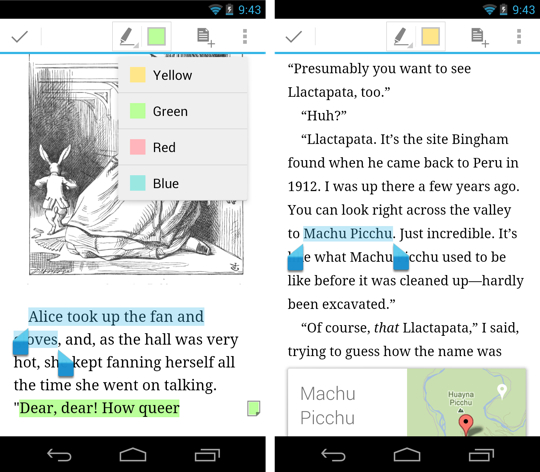
Books are available to purchase and add to your library on the web, on your Android devices and on iOS devices in the new countries.
You can choose from millions of titles on Google Play including new releases, New York Times best sellers, up-and-coming authors, and free books. Easily personalize your reading experience, pick up where you left off on your phone, tablet, or computer, and get reading today!
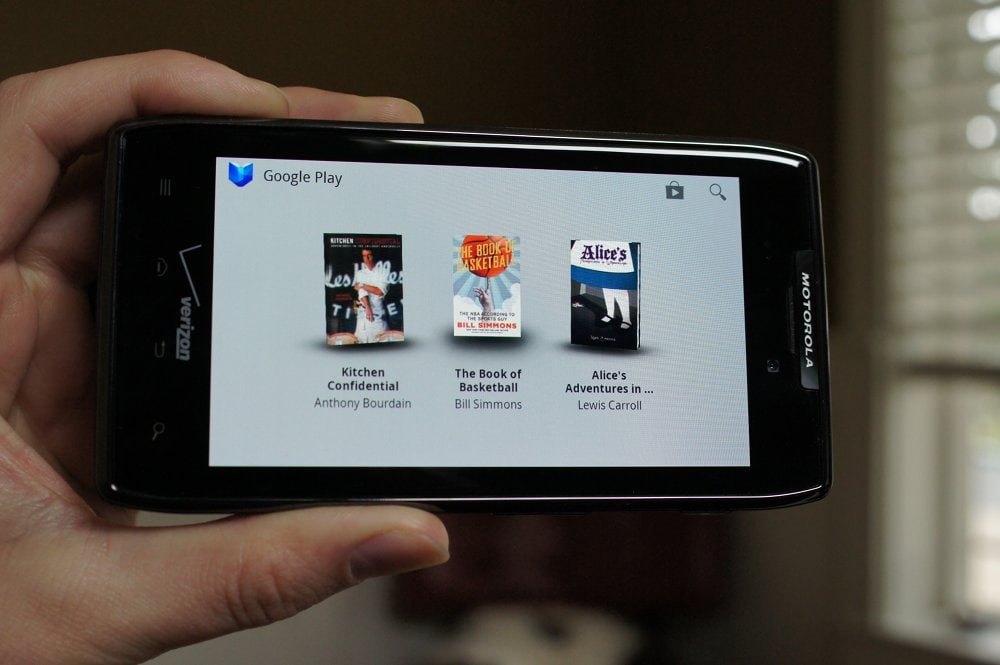
Enjoy reading thousands of titles from new releases to classics on Android (goo.gl/sa0xY), iOS (goo.gl/dDSID) and the web (goo.gl/S1wpC).
Source
Thursday, April 25, 2013


S4 Life companion

Performance and Specs
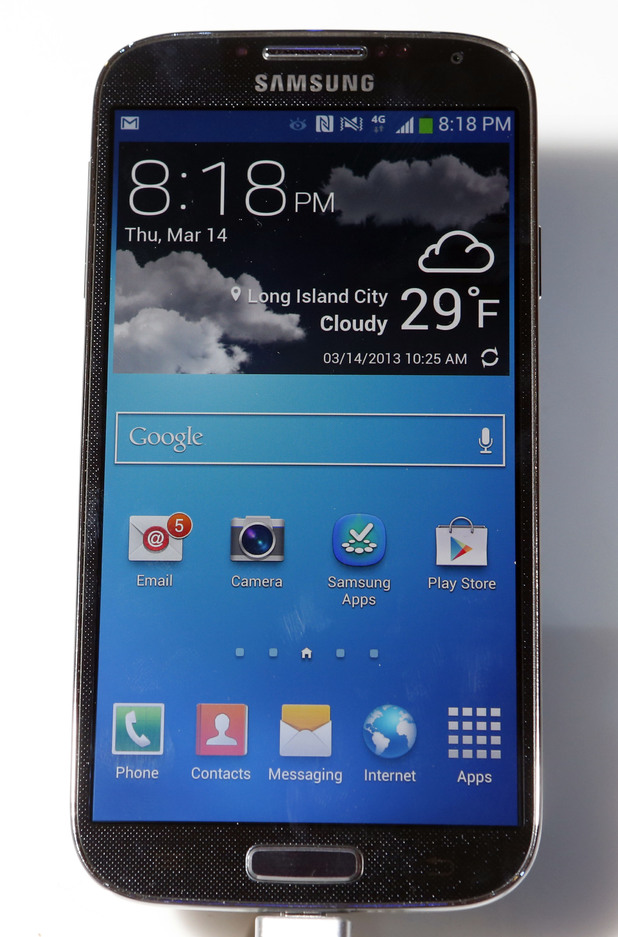


Samsung Galaxy S4 specs
- Network: 2.5G (GSM/ GPRS/ EDGE): 850 / 900 / 1800 / 1900 MHz; 3G (HSPA+ 42Mbps): 850 / 900 / 1900 / 2100 MHz; 4G (LTE Cat 3 100/50Mbps) : up to 6 different band sets(Dependent on market)
- Display: 5 inch Full HD Super AMOLED (1920 x 1080) display, 441 ppi
- Processor: 1.9GHz quad-core processor / 1.6GHz octa-core processor (will differ depending on market)
- OS: Android 4.2.2 Jelly Bean
- Rear Camera: 13 Mega pixel Auto Focus camera with Flash & Zero Shutter Lag, BIS
- Front Camera: 2 Mega pixel camera, Full HD recording @30fps with Zero Shutter Lag, BIS
- Video: Codec: MPEG4, H.264, H.263, DivX, DivX3.11, VC-1, VP8, WMV7/8, Sorenson Spark, HEVC; Recording & Playback: Full HD (1080p)
- Audio: Codec: MP3, AMR-NB/WB, AAC/AAC+/eAAC+, WMA, OGG, FLAC, AC-3, apt-X
- Camera Features: Dual Camera: Dual Shot / Dual Recording/ Dual Video Call
Drama Shot, Sound & Shot, 360 Photo, Cinema Photo, Eraser, Night, Best Photo, Best Face,
Beauty Face, HDR (High Dynamic Range), Panorama, Sports - Additional Features: Group Play: Share Music, Share Picture, Share Document, Play Games
Story Album, S Translator, Optical Reader
Samsung Smart Scroll, Samsung Smart Pause, Air Gesture, Air View,
Samsung Hub, ChatON (Voice/Video Call, Share screen, 3-way calling)
Samsung WatchON
S Travel (Trip Advisor), S Voice™ Drive, S Health
Samsung Adapt Display, Samsung Adapt Sound
Auto adjust touch sensitivity (Glove friendly)
Safety Assistance, Samsung Link, Screen Mirroring
Samsung KNOX (B2B only) - Google Mobile Services: Google Search, Google Maps, Gmail, Google Latitude, Google Play Store, Google Plus, YouTube, Google Talk, Google Places, Google Navigation, Google Downloads, Voice Search
- Connectivity: WiFi 802.11 a/b/g/n/ac (HT80), GPS / GLONASS, NFC, Bluetooth® 4.0 (LE), IR LED (Remote Control), MHL 2.0
- Sensors: Accelerometer, RGB light, Geomagnetic, Proximity, Gyro, Barometer, Temperature & Humidity, Gesture
- RAM: 2GB
- Internal Storage: 16/ 32/ 64 GB User memory + microSD slot (up to 64GB)
- Dimensions: 136.6 x 69.8 x 7.9 mm, 130g
- Battery: 2,600 mAh
Samsung Galaxy S4 vs HTC One Video the most epic Android face-off for the first half of 2013. The Samsung Galaxy S4 and HTC One are coming out at about the same time to go ahead and have it out with one another. When the Galaxy S4 and One are in the same room, there sure ain't much love in the air, which is going to make this fight all the more interesting.


